> For clean Markdown of any page, append .md to the page URL.
> For a complete documentation index, see https://docs.mangopay.com/guides/sca/factors/llms.txt.
> For AI client integration (Claude Code, Cursor, etc.), connect to the MCP server at https://docs.mangopay.com/_mcp/server.
# Factors
## Docs
- [WebAuthn passkey on iOS](https://docs.mangopay.com/guides/sca/factors/passkey-ios.md): Integrate Mangopay's passkey factor in iOS apps
- [WebAuthn passkey on Android](https://docs.mangopay.com/guides/sca/factors/passkey-android.md): Integrate Mangopay's passkey factor in Android apps
> **Note:** This page contains both a page directory (above) and the landing page content (below). The page directory is generated for agent use and does not appear on the landing page.
> For clean Markdown of any page, append .md to the page URL.
> For a complete documentation index, see https://docs.mangopay.com/guides/sca/factors/llms.txt.
> For AI client integration (Claude Code, Cursor, etc.), connect to the MCP server at https://docs.mangopay.com/_mcp/server.
# Authentication factors
> Learn how authentication factors work on the hosted webpage
## Introduction
Mangopay delivers SCA via a unique session on a hosted webpage. The URL for the session is returned on relevant API calls, and your platform needs to redirect the user to complete the session – see [SCA session](/guides/sca/session) for details on how to do this.
For the user, Mangopay's SCA session provides a user-friendly experience that guides them efficiently through all the necessary steps relating to all required factors.
Mangopay's hosted SCA session handles both enrollment and authentication.
> **Note**
>
> **Note – Session lifetime 10 minutes**
>
> The unique SCA session is valid for 10 minutes once the `PendingUserAction.RedirectUrl` is returned by the API.
>
> During this time, the individual must complete all necessary steps for all factors for the session to be considered successful.
>
> The session is identified by the unique token in the `RedirectUrl`. So if the user refreshes the screen, or closes and re-opens the same link, then they can continue using the same session within 10 minutes.
### Customization
By default, the SCA hosted experience is tailored to your platform by using:
* Your platform’s **trading name**, shown by **TradingName** in the screenshots below.
To modify the trading name text, contact Mangopay [via the Dashboard](https://hub.mangopay.com/).
* Your platform’s **logo**, if provided
To add or update the logo, send a new file on the [PUT Update a Client Logo](/api-reference/client/upload-client-logo) endpoint (for example, using [Postman](https://www.postman.com/mgp-productstars/mangopay-sandbox/request/15344095-8e8c94ee-3cd6-4bdb-ad7c-b4cdadb5da41)) or contact Mangopay. To remove the logo entirely, contact Mangopay.
#### Branding colors
You can also customize two accent colors of the hosted experience to match your branding. To do so, you need to do two things:
* Define the `PrimaryThemeColour` and `PrimaryButtonColour` hex values by calling the [PUT Update a Client](/api-reference/client/update-client) endpoint (for example, using [Postman](https://www.postman.com/mgp-productstars/workspace/mangopay-sandbox/request/15344095-1416a736-2269-4d3c-89d4-5ff182ca51be)). Note that you need to wait about an hour for the API colors to appear in the SCA session.
* Add the query parameters to the SCA `RedirectUrl` value to use the colors in the session when you [redirect the user](/guides/sca/session):
* Add `&primary=true` to use the `PrimaryThemeColour`
* Add `&cta=true` to use the `PrimaryButtonColour`
If you set only `primary=true`, then the `PrimaryThemeColour` is used for the CTA button as well as the icon accent elements.
If you set only `cta=true`, then the `PrimaryButtonColour` is used for the CTA button and the T\&Cs checkbox, but not the icon accents.
##### Example
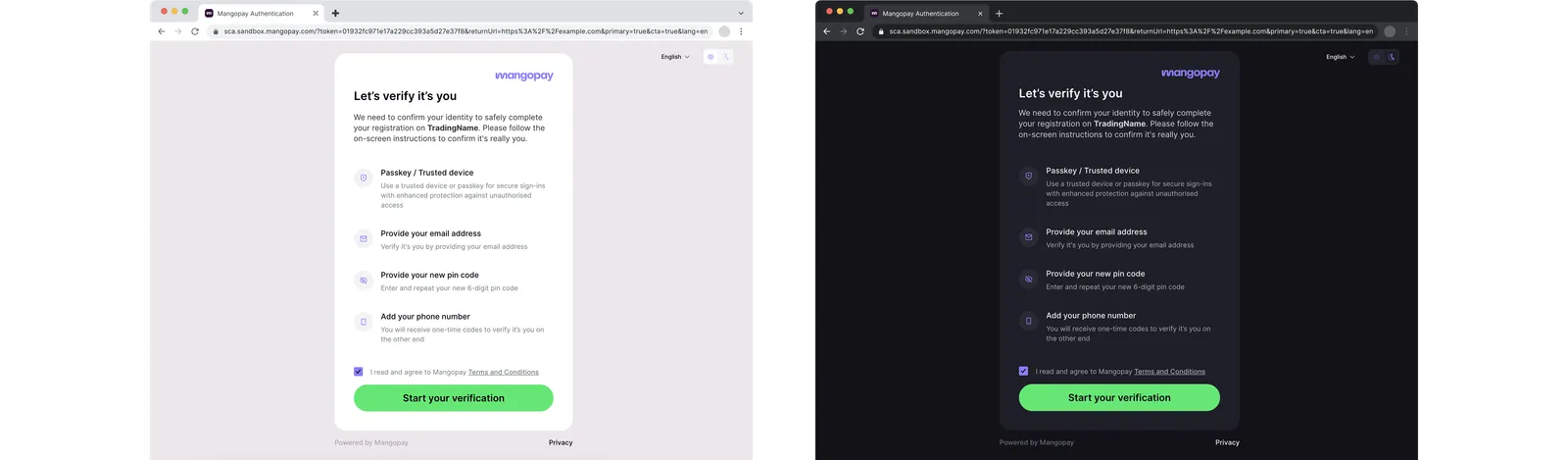
In the screenshot below:
* The Mangopay logo is a purple PNG file uploaded via the [PUT Update a Client Logo](/api-reference/client/upload-client-logo)
* Both query parameters (`&primary=true&cta=true`) have been added to the `RedirectUrl` value before redirection (after the encoded `returnUrl`)
* The `PrimaryThemeColour` is the **purple** (#867EFF) of the icon accent elements (except the Mangopay logo)
* The `PrimaryButtonColour` is the **green** (#89E481) of the CTA button
#### Theme
You can also force dark mode or light mode for the user, but note that if the user changes it in the session then their preference is stored as a local cookie and takes precedence for 30 days:
* Add `&theme=dark` for dark mode
* Add `&theme=light` for light mode
### Localization
The hosted SCA page is automatically set to the language of the user's browser if it is one of the following supported languages: Bulgarian, Dutch, English, French, German, Greek, Italian, Polish, Portuguese, Spanish, Swedish.
Regional variants for the same language resolve to the single translation supported by Mangopay: e.g. `es-419` (Latin American Spanish) resolves to `es`, `en-US` (American English) resolves to `en`.
If the browser is in a language not listed above, the session is in English by default.
You can override this and manually set the language for the session before you redirect the user – [read more](/guides/sca/session#5-set-the-session-language-optional).
If the SMS OTP factor is used, then it is also localized based on the browser language or your override.
### Mobile breakpoint
The breakpoint between mobile and desktop is 600px, so to ensure the desktop version is rendered you should set that as the minimum width. The height is variable depending on the content in both the options implemented, the screens for each factor, and the localization.
### iframe integration
#### Passkey factor in an iframe
If your integration is opening the SCA session in an `
```
#### Production SCA
```html
```
#### Both
```html
```
As shown above, if you're using a single environment with both the Sandbox and Production versions of Mangopay's SCA hosted experience, then you can list both domain origins separated by a space for each permission directive.
Mangopay's hosted SCA domains:
* `https://sca.sandbox.mangopay.com` – Sandbox for testing and integration
* `https://sca.mangopay.com` – Production
The permissions required by the SCA session:
* `publickey-credentials-create` – To [create a passkey](https://developer.mozilla.org/en-US/docs/Web/HTTP/Reference/Headers/Permissions-Policy/publickey-credentials-create) on the device
* `publickey-credentials-get` – To [retrieve a passkey](https://developer.mozilla.org/en-US/docs/Web/HTTP/Reference/Headers/Permissions-Policy/publickey-credentials-get) from the device
* `otp-credentials` (optionally, for [OTP factor](#otp)) – To enable the [auto-filling of an OTP code](https://developer.mozilla.org/en-US/docs/Web/HTTP/Reference/Headers/Permissions-Policy/otp-credentials) received on the device
#### Share and verify your domains with Mangopay
To offer the passkey in an `