> ## Documentation Index
> Fetch the complete documentation index at: https://docs.mangopay.com/llms.txt
> Use this file to discover all available pages before exploring further.

# Identity proof best practices

export const IconRedCross = <svg width="25" height="24" viewBox="0 0 25 24" fill="none" xmlns="http://www.w3.org/2000/svg">
<path fill-rule="evenodd" clip-rule="evenodd" d="M12.0032 24.0095C18.6306 24.0147 24.0076 18.6464 24.0127 12.019C24.0181 5.39151 18.6497 0.0147133 12.0222 0.00946425C5.39478 0.00424574 0.0180701 5.37259 0.012699 12C0.00757203 18.6274 5.37598 24.0042 12.0032 24.0095ZM9.90967 8.09626C9.41138 7.59726 8.60303 7.59653 8.10425 8.09464C7.60523 8.59275 7.60474 9.40107 8.10279 9.90006L10.2078 12.0083L8.1001 14.1128C7.60108 14.6109 7.60059 15.4192 8.09864 15.9182C8.59693 16.4172 9.40528 16.418 9.9043 15.9199L12.012 13.8154L14.1169 15.9236C14.6152 16.4227 15.4233 16.4234 15.9224 15.9253C16.4211 15.4272 16.4219 14.6189 15.9236 14.1198L13.8186 12.0116L15.9265 9.90717C16.4253 9.40906 16.426 8.60074 15.9277 8.10172C15.4294 7.60273 14.6211 7.60199 14.1223 8.1001L12.0144 10.2045L9.90967 8.09626Z" fill="#FF928B" />
</svg>;

export const IconGreenCheck = <svg width="25" height="25" viewBox="0 0 25 25" fill="none" xmlns="http://www.w3.org/2000/svg">
<path fill-rule="evenodd" clip-rule="evenodd" d="M12.0033 24.7159C18.6307 24.7211 24.0075 19.3528 24.0127 12.7254C24.018 6.09797 18.6496 0.721152 12.0222 0.715921C5.3948 0.710691 0.0179769 6.07903 0.0127468 12.7064C0.00751663 19.3339 5.37586 24.7107 12.0033 24.7159ZM16.8341 11.285C17.2648 10.8295 17.2653 10.0903 16.8352 9.63399C16.4052 9.1777 15.7074 9.17709 15.2767 9.63262L10.9099 14.2513L8.75197 11.9617C8.32192 11.5054 7.62415 11.5048 7.19345 11.9603C6.76276 12.4159 6.76223 13.155 7.19229 13.6113L10.1289 16.7271C10.5589 17.1834 11.2567 17.184 11.6874 16.7284L16.8341 11.285Z" fill="#89E481" />
</svg>;

export const LegalRepresentative = ({content}) => <Tooltip tip="An individual legally appointed to represent a legal entity, authorized to sign contracts on its behalf.">
        {content}
    </Tooltip>;

Both natural and legal users must provide an official identity document (ID) as proof of identity during the verification process. For legal users, it is the entity’s <LegalRepresentative content="legal representative" /> who must provide proof of identity.

<Warning>
  **Caution - Accepted documents vary by country**

  Not all kinds of official identity documents are accepted for all countries. Check which documents can be submitted per country in the [Accepted ID documents](/guides/users/verification/requirements/id-accepted) article.
</Warning>

## Best practices

When uploading files, it is very important that the user respects the best practices below to ensure that the document can be read and verified.

If any of the guidelines are not respected, it may result in an error or delay in processing the document.

The document should be:

<CardGroup cols={2}>
  <Card icon={IconGreenCheck}>
    One of the [accepted documents](guides/users/verification/requirements/id-accepted) from the country of issue
  </Card>

  <Card icon={IconGreenCheck}>
    Consistent with the information provided for the user
  </Card>

  <Card icon={IconGreenCheck}>
    For passports: one file (double-page spread) uploaded to one KYC Document API object.
  </Card>

  <Card icon={IconGreenCheck}>
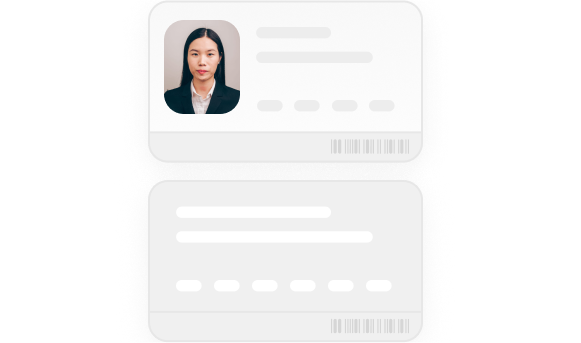
    For ID cards, driving licenses, residence permits: two files (front and back) uploaded to one KYC Document API object.
  </Card>

  <Card icon={IconGreenCheck}>
    Valid and up to date
  </Card>

  <Card icon={IconGreenCheck}>
    For a person aged over 18
  </Card>

  <Card icon={IconGreenCheck}>
    A color photo (rather than a scan from an image scanner, like a flatbed photocopier or a printer)
  </Card>

  <Card icon={IconGreenCheck}>
    Between 32KB and about 7MB (max. 10MB when encoded)
  </Card>

  <Card icon={IconGreenCheck}>
    In one of the accepted formats: PNG, PDF, JPG, JPEG
  </Card>
</CardGroup>

See the how-to guide for guidance in technical implementation:

<Card title="How to" href="/guides/users/verification/documents/submission/how-to">
  Submit a KYC Document for verification
</Card>

## Errors to avoid

Below are some common errors than can lead to a document being refused:

<CardGroup cols={2}>
  <Card icon={IconRedCross}>
    <img src="https://mintcdn.com/mangopay/ga_wyIp8pWx6MTlP/images/illu-id-edges-not-visible.png?fit=max&auto=format&n=ga_wyIp8pWx6MTlP&q=85&s=e6b3b7fbe05179c15455972cdc516594" width="581" height="343" data-path="images/illu-id-edges-not-visible.png" />

    <br />

    Edges not fully visible
  </Card>

  <Card icon={IconRedCross}>
    <img src="https://mintcdn.com/mangopay/ga_wyIp8pWx6MTlP/images/illu-id-mrz-not-readable.png?fit=max&auto=format&n=ga_wyIp8pWx6MTlP&q=85&s=d273da58e77b3a78df08a195e0d43816" width="581" height="343" data-path="images/illu-id-mrz-not-readable.png" />

    <br />

    Machine-readable zone (MRZ), data, or photo not fully visible
  </Card>

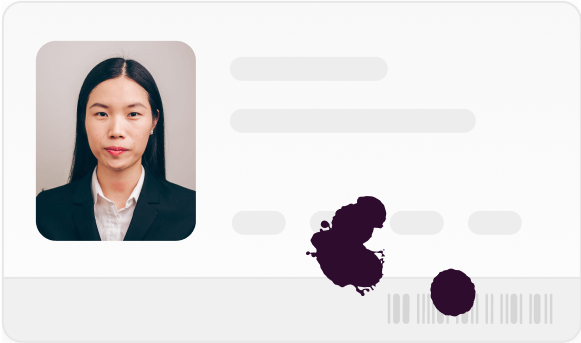
  <Card icon={IconRedCross}>
    <img src="https://mintcdn.com/mangopay/ga_wyIp8pWx6MTlP/images/illu-id-covered-finger.png?fit=max&auto=format&n=ga_wyIp8pWx6MTlP&q=85&s=87e6fbf34bb9409118f8d6ef53fb2e67" width="581" height="343" data-path="images/illu-id-covered-finger.png" />

    <br />

    Covered by anything, especially a finger
  </Card>

  <Card icon={IconRedCross}>
    <img src="https://mintcdn.com/mangopay/ga_wyIp8pWx6MTlP/images/illu-id-glare-flash.png?fit=max&auto=format&n=ga_wyIp8pWx6MTlP&q=85&s=756483690b8e70711c45035ad3d31c3f" width="581" height="343" data-path="images/illu-id-glare-flash.png" />

    <br />

    Glare or flash obscuring readability
  </Card>

  <Card icon={IconRedCross}>
    <img src="https://mintcdn.com/mangopay/ga_wyIp8pWx6MTlP/images/illu-id-blurred.png?fit=max&auto=format&n=ga_wyIp8pWx6MTlP&q=85&s=4b37e944b1478607d2fbe8b44afe33dd" width="581" height="343" data-path="images/illu-id-blurred.png" />

    <br />

    Blurred
  </Card>

  <Card icon={IconRedCross}>
    <img src="https://mintcdn.com/mangopay/ga_wyIp8pWx6MTlP/images/illu-id-black-white.png?fit=max&auto=format&n=ga_wyIp8pWx6MTlP&q=85&s=1fa0a5c1f50875eb0eb8dcbe92ae8c33" width="581" height="343" data-path="images/illu-id-black-white.png" />

    <br />

    Black and white
  </Card>

  <Card icon={IconRedCross}>
    <img src="https://mintcdn.com/mangopay/ga_wyIp8pWx6MTlP/images/illu-id-both-side-one-page.png?fit=max&auto=format&n=ga_wyIp8pWx6MTlP&q=85&s=8e355a3f6736b21e39b037fc0c662ad1" width="581" height="343" data-path="images/illu-id-both-side-one-page.png" />

    <br />

    Card-type with both sides in one file
  </Card>

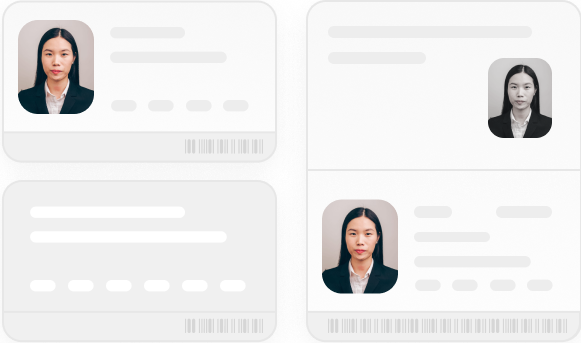
  <Card icon={IconRedCross}>
    <img src="https://mintcdn.com/mangopay/ga_wyIp8pWx6MTlP/images/illu-id-passport-simultaneously.png?fit=max&auto=format&n=ga_wyIp8pWx6MTlP&q=85&s=f4b023f9ff049672bd2b08444c19de17" width="581" height="343" data-path="images/illu-id-passport-simultaneously.png" />

    <br />

    Two types of document submitted simultaneously (in the same file or not)
  </Card>
</CardGroup>

## Related resources

<CardGroup cols={2}>
  <Card title="Guide" href="/guides/users/verification/requirements">
    Learn about verification requirements for each user type

  </Card>
</CardGroup>