Payment method activation
Introduction
After going live with Mangopay, your platform may wish to expand its pay-in offering to include additional payment methods or currencies not in your initial contract.
This page describes how the activation process works – how to proceed, what is required, and what the steps are.
The activation of additional payment methods follows a controlled process to ensure regulatory compliance, operational stability, and a reliable experience for your end users and platform.
Scope
The process described below applies to:
- All payment methods offered by Mangopay – cards, banking payment methods, digital wallets like Apple Pay and Google Pay, as well as other alternative payment methods (APMs) including any Buy Now Pay Later (BNPL) methods such as Klarna.
- Additional currencies for payment methods already activated
- Activation in your Production environment – activation in Sandbox may happen earlier to allow for technical validation, but this is no guarantee of Production approval
Note – Payment methods and currencies are not enabled by default
Payment methods and currencies are not enabled by default and always require an explicit activation request.
Activation overview
Activating a new payment method involves five key stages. Depending on the payment method and your technical readiness, some of these steps may run in parallel:
- Activation request – Request a payment method by providing information about your business case and technical requirements.
- Contractual setup – Review and agree to pricing, terms, and amendments.
- Compliance and regulatory approval – Undergo risk, compliance, and scheme-specific checks.
- Configuration and enablement – Technical activation in production and external onboarding (if applicable).
- Integration, testing, and go-live – End-to-end testing in Sandbox prior to processing real transactions.
Note – External dependencies may impact timelines
External dependencies such as payment schemes, banking partners, or third-party portals can vary significantly and may impact overall activation timelines.
1. Activation request
How to request
To initiate the process, contact the Support team directly via the Mangopay Dashboard with the information below.
Information to provide
Please provide the following details in your request:
- Payment method(s) requested
- Currencies requested
- Countries or markets where the method or currency will be offered
- Requested maximum transaction amount
- Estimated monthly processing volume
- Average transaction amount
- Use cases or flows (one-time, recurring, preauthorized etc.)
- Channels (desktop web, mobile web, native in-app)
- Integration type (API-based or via Checkout SDK if it supports the payment method)
- Target availability (go-live) date for:
- Sandbox
- Production
Note – Further information may be required
Depending on the requested payment method and use case, Mangopay may request additional information or documentation to complete the request.
Responding promptly to any follow-up steps helps avoid delays in initiating the process.
2. Contractual setup
Once your request has been reviewed, Mangopay confirms:
- Availability of the scope (if applicable), such as by country, legal entity, or specific payment flow.
- Applicable pricing
- Operational or settlement conditions about how the payment method works (as per the documentation)
- Any contractual amendments that may be required
Contractual acceptance is mandatory before Production activation can proceed.
3. Compliance and regulatory approval
Payment method activation is subject to risk, compliance, and regulatory checks.
Depending on the payment method, region, and business model, Mangopay may request:
- An update to the KYB/KYC documentation it holds for your platform
- Descriptions of products or services
- A review of the proposed checkout and payment flows
- Confirmation of any applicable requirements for compliance with the relevant scheme or payment method provider
Some payment methods are subject to restrictions in terms of industry, geography, or use case.
4. Configuration and enablement
Once approved, Mangopay will enable the payment method in the Production environment for your ClientId.
Typically, the same configuration is also implemented in Sandbox at this stage to enable testing and integration.
Caution – Sandbox activation does not guarantee Production approval
In some cases, a payment method or currency may be enabled in Sandbox prior to its approval in Production, for example to allow for technical validation of the solution.
However, the Sandbox configuration has not bearing on the process for Production approval. Activation in Production remains contingent on passing all contractual, compliance, and operational checks.
A payment method or currency request may be declined for Production even if successfully tested in Sandbox.
External setup (if applicable)
Some payment methods require configuration or additional integration on your side, outside of the Mangopay ecosystem. This may include:
- Accepting third-party terms and conditions directly with the payment provider
- Completing a dedicated onboarding flow within an external merchant portal
- Generating and providing specific cryptographic certificates or merchant identifiers
- Integration of an external payment provider’s API (such as Google Pay and Apple Pay)
Activation or go-live may not be possible until all external steps are successfully finalized.
5. Integration, testing, and go-live
Before processing live transactions for you users, it essential to rigorously test your implementation in the Sandbox environment.
Mangopay’s documentation provides more detailed guidance for each payment method and all its API endpoints.
Ensure your integration correctly accommodates:
- Redirects – In many flows, users must be redirected to authenticate or complete the payment
- Webhooks – Pay-in flows are generally asynchronous and your integration must rely on webhooks for status updates
- All outcomes – Your system needs to handle non-successful cases, as well as refunds, disputes, and reconciliation flows
- Reporting – Mangopay provides extensive reporting capabilities via the Dashboard and its API that your platform can rely on for settlement and visibility
Limits and controls
When a payment method is activated, Mangopay may apply limits and controls, such as:
- Transaction limits, impacting the minimum and maximum amounts allowed per transaction
- Constraints on refunds or disputes
- Thresholds on payouts
The limits applied may be:
- Defined by schemes or banking partners
- Required by regulation
- Applied as part of Mangopay’s risk framework
Some limits are fixed, while others may be reviewed after launch based on performance.
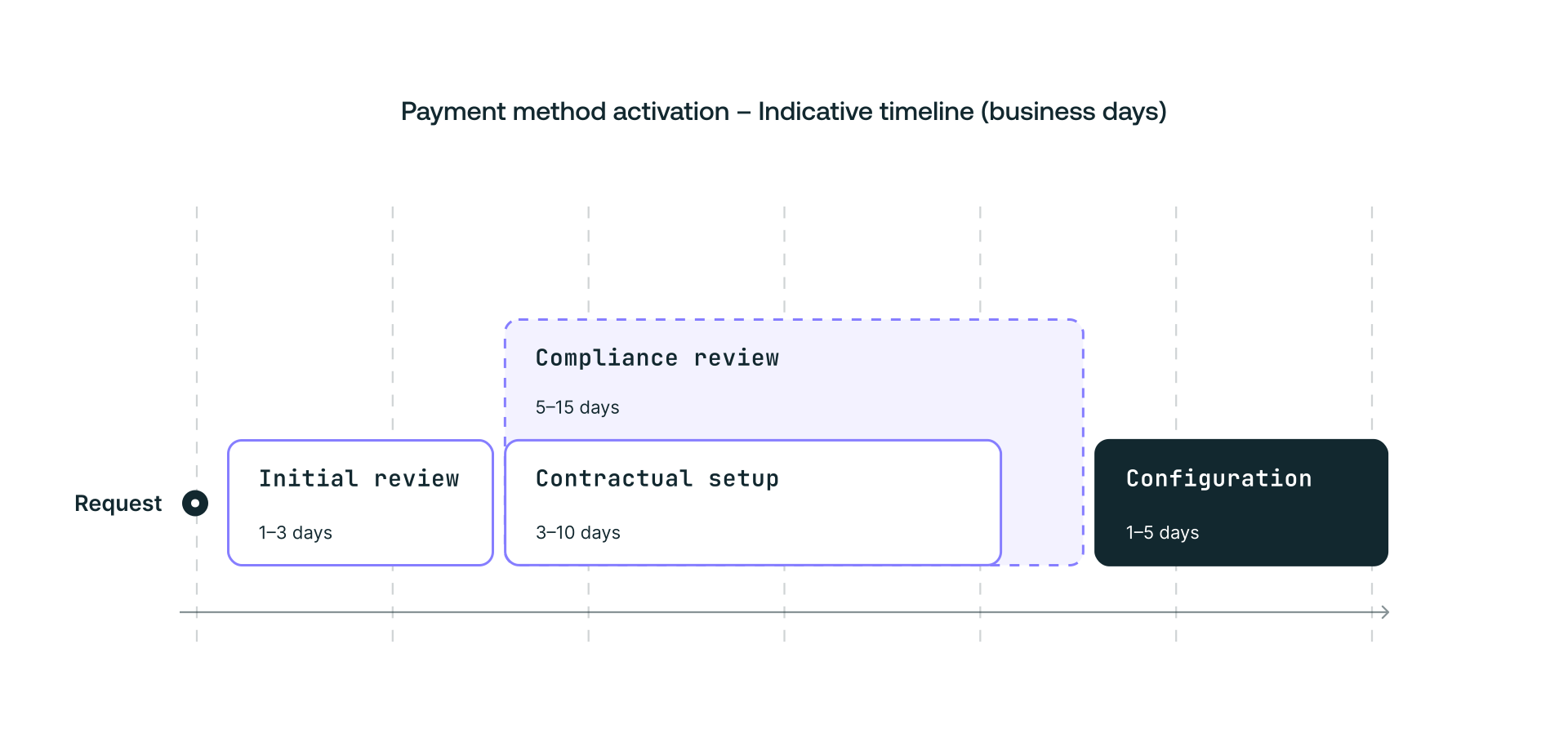
Indicative activation timeline
The timelines for activation vary depending on payment methods, currencies, geographies, and external dependencies.