

How Echo works
Overview diagram
The diagram below gives an overview of how Echo works, focusing on the settlement of funds and reconciliation. The main sections of this guide are highlighted.
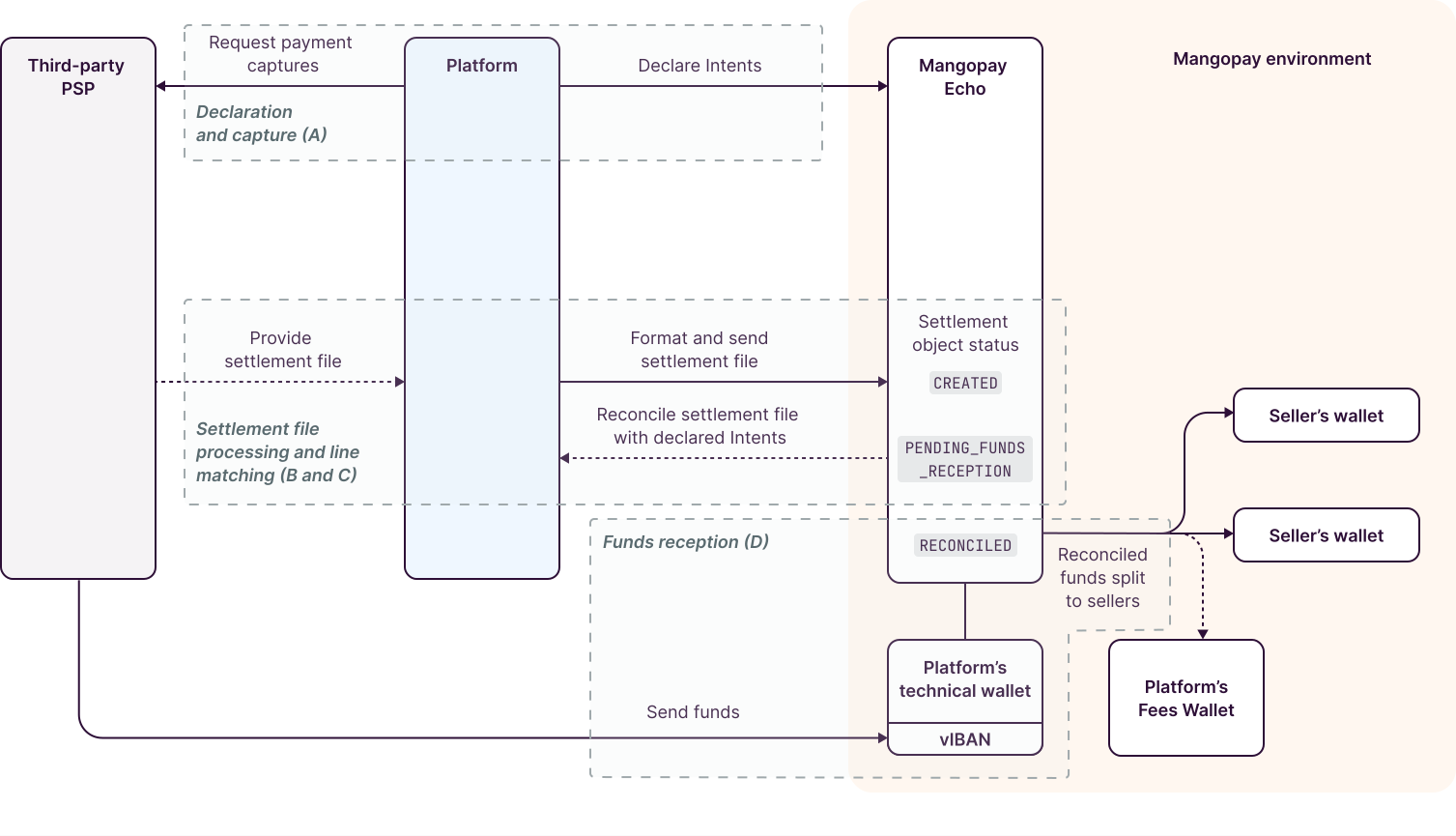
A. Declaration and capture
Your platform declares transactions as Intents, identified with the ExternalProviderReference.
Once created, an Intents’ Status value is AUTHORIZED before being declared as CAPTURED. These Intents are not yet reconciled and the corresponding funds have not been received.
B. Settlement file processing
When your platform uploads a settlement file to Mangopay, the Echo system starts to parse the file.
Echo first checks that the file is valid (expected format, single currency, etc.). Once done, the Status becomes CREATED. If the file is not valid and the matching process cannot start, the Status becomes FAILED and the process stops for that file.
Note – Settlement data must match intent data
It is critical that the data in the settlement fil matches the intents that you declared. If provider IDs or amounts are not matched then the reconciliation will fail.
You can monitor this by checking the settlement file Status and using the dedicated endpoint to check any settlement errors, GET View validation errors for a Settlement.
You need to address any failures, errors, or partially matched funds to prevent any delays in payouts to sellers.
C. Line matching
Once the file is validated, Echo proceeds to reconciliation.
Echo iterates through each transaction line of the file and attempts to match the ExternalProviderReference to a corresponding unreconciled Intent declared previously.
Fully successful matching
If a match is found for all lines, the Settlement Status changes to PENDING_FUNDS_RECEPTION.
At the same time, the associated Intent is updated:
- The
SettlementIdis linked in the Intent - The
Statusof the Intent’s Capture becomesSETTLED_NOT_PAID - The
Statusof any created Splits becomesPENDING_FUNDS_RECEPTION.
Unsuccessful matching attempts
If a match is found for some lines of the file, the Settlement Status changes to PARTIALLY_MATCHED.
If no lines could be matched, the status becomes UNMATCHED.
In both PARTIALLY_MATCHED and UNMATCHED cases, no part of the Settlement is settled using any funds that may arrive on the Virtual Account.
These Settlements need to be re-uploaded so that they can be fully matched, using the POST Update a Settlement and generate a new upload URL endpoint.
D. Funds reception
The final step is that Mangopay receives funds from your platform’s partner PSP to a dedicated Virtual Account and associated wallet.
When the system receives unallocated funds, it checks the amount with the oldest matched Settlement’s ActualSettlementAmount.
If the funds received are sufficient:
- The Settlement’s
StatusbecomesRECONCILED - The Intent’s Capture’s
StatusbecomesPAID - The
AvailableAmountToSplitis populated with the received amount - The Intent’s Splits become
AVAILABLE
If the funds are not sufficient, the Settlement’s Status becomes INSUFFICIENT_FUNDS. These settlements remain unmatched and are retried when additional funds are received on the dedicated Virtual Account’s wallet.
So, when funds arrive on the virtual account, the system looks for the oldest Settlement that has a Status of PENDING_FUNDS_RECEPTION or INSUFFICIENT_FUNDS and settles it first, passing the object to RECONCILED.
Settlement file state machine
The overall state machine for a Settlement object is below: